Skip to content
Contact

PRODUCT · 01

BORA

The operating system for real estate valuation.

01 /

Who it is for

Real estate (primary) and banks: runs the valuation lifecycle from bank request to signed report, including title deed queries and regulator record generation.

Where it is used

  • Real estate valuation: every step, from the moment a request arrives to the signed report, runs in one place.
  • Banking: valuation requests are collected, and the completed report goes back to the bank.
  • Title deed and project data: records from different cities are consolidated into a single table; where each piece of information came from stays visible.
  • Regulator record: the record to be submitted to the authority is extracted automatically from the signed report.
  • Construction and building inspection: the survey taken on site is compared with the approved project, and any difference is recorded.
  • Municipality: the building's compliance with the plan underlying its permit is checked the same way.

02 /

Requests, documents, and title deeds
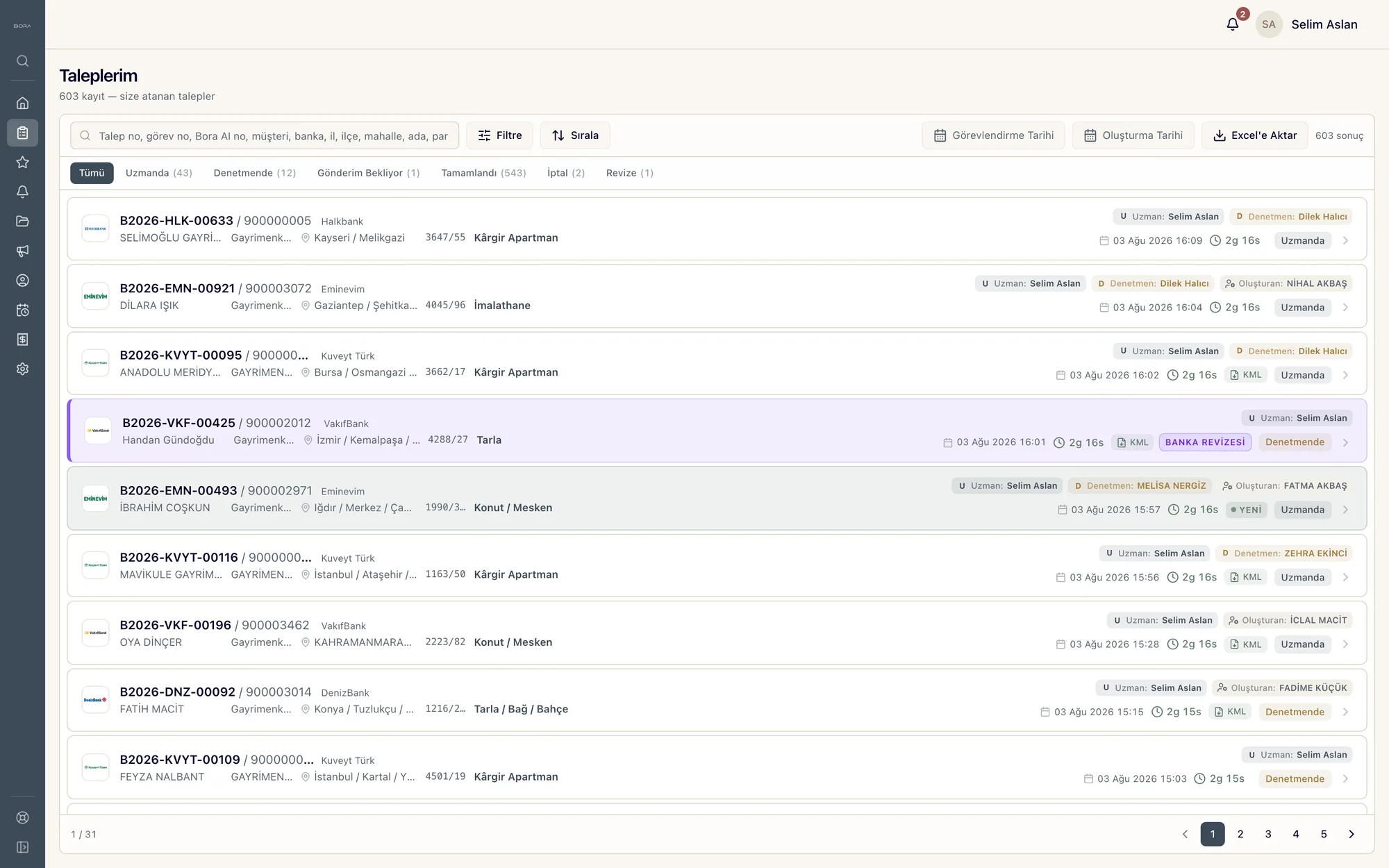
Screen listing requests assigned to appraisers: 603 records, status tabs, and on each row the block-parcel, property type, assigned appraiser and reviewer, creation time, elapsed time, and request status.
STAGE 01–03automation · model

Request intake · Document reading · Title deed and project

When a bank request arrives, automation pulls it in and writes it to the BoraAI platform; there is no manual entry.

The request's attachments and documents pass through the OCR layer; the draft report begins to take shape from this reading.

The title deed record and architectural project are collected automatically from the source system, run through OCR, and entered into the report.

03 /

Assignment and scheduling
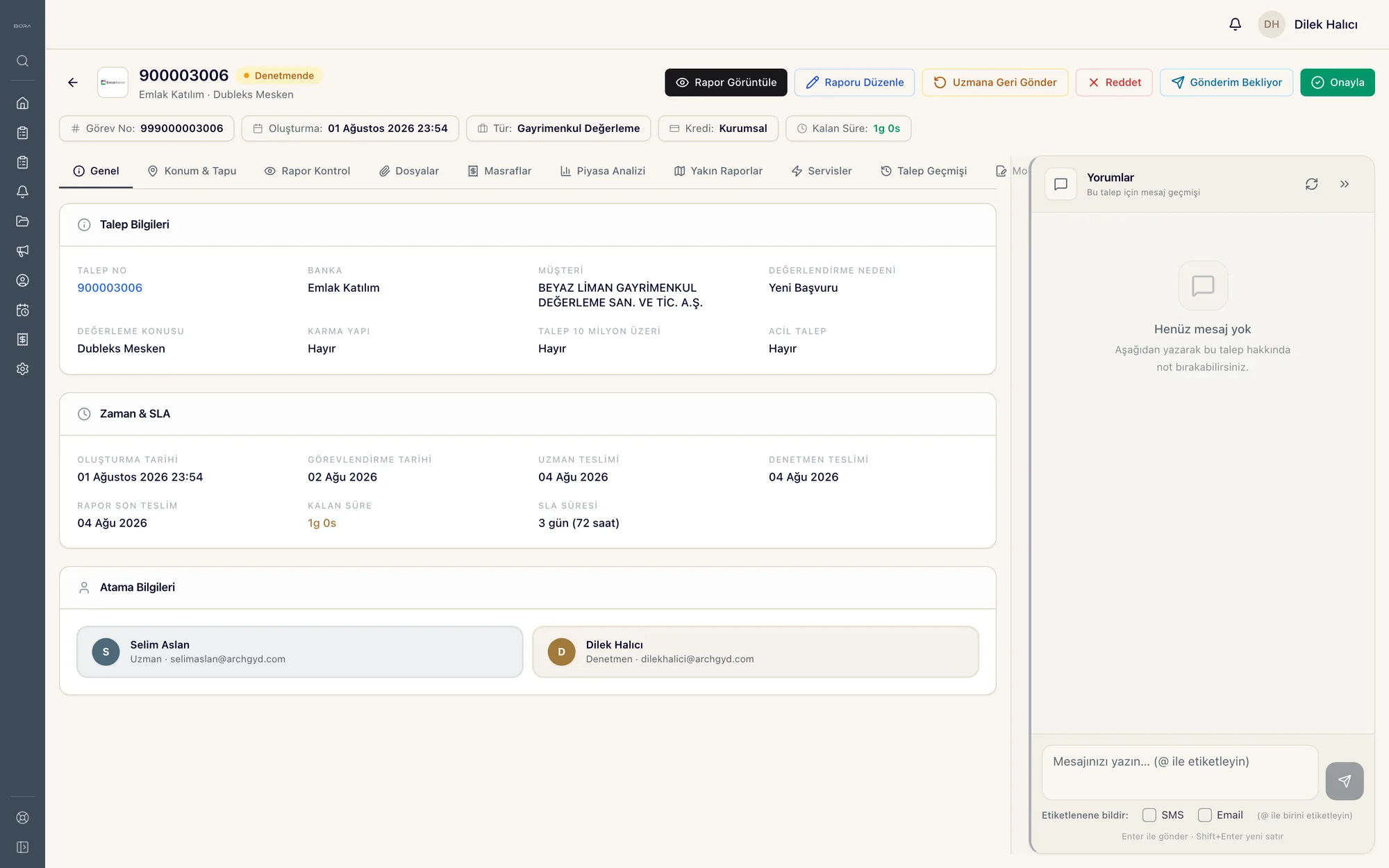
Request detail screen: request information, time and SLA card, and assignment details; assignment date, appraiser and reviewer due dates, time remaining, and assignees.
STAGE 04–05model

Appraiser assignment · Appointment and route

Each request is assigned to the valuation expert best suited to the job by an algorithm that considers workload, years of experience, and location.

The voice agent calls the property owner to book a site visit, writes the appointment to the calendar, and arranges the day by route.

04 /

In the field
STAGE 06–09specialist · model · automation

Document collection · LiDAR scan · Plan comparison · Data ingestion

At the municipality, the appraiser photographs or scans the required documents with BoraAI Mobile.

At the property, the appraiser scans the interior with LiDAR using the mobile app; the appraiser's work is limited to taking photographs.

The scan is compared with the architectural project through the model; construction that deviates from the project and cut columns are detected and written into the report.

Once the site work is complete, address data, comparable listings, the energy performance certificate, and map images are collected automatically from their sources, flagged, and added to the report.

05 /

Signature and archive
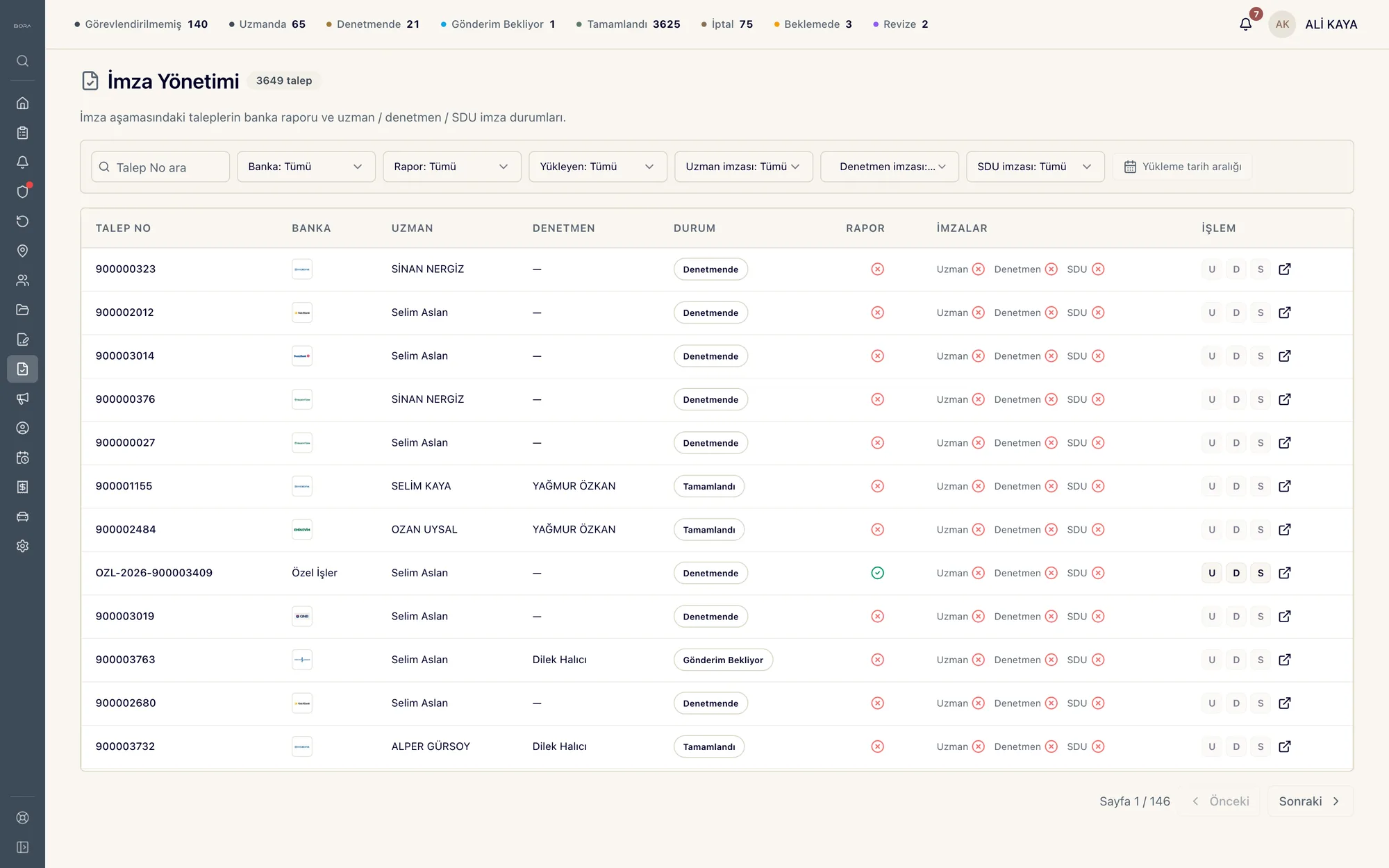
Signature management screen: requests at the signature stage, status counters in the top strip, and on each row the signature status of the appraiser, reviewer, and SDU along with the report upload status
STAGE 10–11model · automation

Specification review · Signature and archive

The retrieval pipeline checks the report against the bank's technical specification; it flags errors, corrects them, and scores the report.

A report that passes review is signed and archived automatically; the signature happens within the flow rather than waiting as a separate step.

06 /

End-to-end flow

Eleven stages from request to archived report. Nine are run by automation and models; two stages remain for the appraiser to perform in the field.
BoraAI report flow — eleven stages from request to archived reportAlong an unbroken lane, automation and models run nine stages; the last stop is signature and archive. The lane breaks in only one place: the two stages the appraiser performs in the field — document collection and the LiDAR scan — sit on a separate pad outside the lane.AUTOMATION AND MODELAPPRAISER · FIELDFIELD · APPRAISERBANK REQUESTCOMPLETEDREPORT01Request intakeAUTOMATION02Document readingMODEL03Title deed and projectAUTOMATION04Appraiser assignmentMODEL05Appointment and routeMODEL06Document collectionAPPRAISER07LiDAR scanAPPRAISER08Plan comparisonMODEL09Data ingestionAUTOMATION10Specification reviewMODEL11Signature and archiveAUTOMATION

The flow consists of eleven stages. Nine are run by automation and models; only the sixth and seventh stages are work the appraiser does in the field.

  1. 01 · Request intake — automation
  2. 02 · Document reading — model
  3. 03 · Title deed and project — automation
  4. 04 · Appraiser assignment — model
  5. 05 · Appointment and route — model
  6. 06 · Document collection — appraiser
  7. 07 · LiDAR scan — appraiser
  8. 08 · Plan comparison — model
  9. 09 · Data ingestion — automation
  10. 10 · Specification review — model
  11. 11 · Signature and archive — automation

07 /

Platform scope

The valuation flow is one of this platform's compartments. The same plate also holds compartments for vehicles and fuel, personnel, regulatory reporting, accounting, management, and fixed assets.
BoraAI platform scope — one plate, seven compartmentsThe valuation flow is one of the compartments of the same platform. The other compartments: vehicles and fuel, personnel, regulatory reporting, accounting, management, and fixed assets.Valuation flowfrom request to archived reportRegulatory reportingVehicles and fuelPersonnelAccountingManagementFixed assetsBoraAI platform

The platform is shown as a single body; its top is divided into seven compartments.

  • Valuation flow — from request to archived report
  • Vehicles and fuel
  • Personnel
  • Regulatory reporting
  • Accounting
  • Management
  • Fixed assets

08 /

From signed report to regulator record

Once the signed valuation report is archived, a separate output is produced from it: fields are read, placed into the schema, and run through the rule set.
Regulatory reporting — from the signed report to a 129-field regulator recordInside the platform's 'regulatory reporting' compartment. At the top, a six-step isometric pipeline: the signed report in the archive, page image, reading model, field extraction, rule check, and the completed regulator record. At the bottom, the record's 129 fields divided into eight categories, with the 23-rule check channel on the left and the detail card of the selected field on the right.RECORD GENERATION · 6 STEPSFrom the signed valuation report to the regulator recordGABİM SCHEMA01SIGNED REPORTthe archived report becomes input02PAGE IMAGEeach page is converted to an image03READING MODELtext and images are read together04FIELD EXTRACTION129 fields land in the schema05RULE CHECK23 rules · format, location, city/district06REGULATOR RECORDa single record is completed129 FIELDS · ONE REGULATOR RECORDEach cell is one field in the schema · 8 categories · 23 rules23 RULES0102030405060708091011121314151617181920212223city-distric…gross ≥ net …gps · parcel…range checkphotos ≥ 8GEOil_koduGEOilce_koduGEOmahalle_koduGEOsokak_adiGEObina_noGEOkapi_noGEOparsel_noGEOada_noGEOpafta_noGEOkadastro_noGEOkoordinat_xGEOkoordinat_yGEOkoordinat_ka…GEOrakim_mGEOuavt_noGEOposta_koduGEOcbs_referansGEObolge_koduGEOkent_icinde_…GEOcadde_adiGEOblok_adiGEOsite_adiTAPtapu_sorgu_t…TAPtapu_mudurlu…TAPmalik_adTAPmalik_tc_kim…TAPhisse_payTAPhisse_paydaTAPtapu_cilt_noTAPtapu_sahife_…TAPtapu_yevmiye…TAPtescil_tarihiTAPkisit_var_miTAPipotek_var_miTAPhaciz_var_miTAPtakyidat_notuTAPtapu_cinsYAPbina_yasiYAPinsaat_yiliYAPkat_adetYAPbodrum_kat_a…YAPyapim_teknigiYAPyapi_sinifiYAPbetonarme_miYAPcelik_karkas…YAPruhsat_tarihiYAPiskan_tarihiYAPdeprem_bolge…YAPzemin_sinifiYAPtasiyici_sis…YAPcephe_sayisiPRTnet_alan_m2PRTbrut_alan_m2PRTarsa_payPRTbagimsiz_bol…PRToda_sayisiPRTsalon_sayisiPRTbanyo_sayisiPRTwc_sayisiPRTkat_noPRTcephe_bilgisiPRTisinma_tipiPRTklima_var_miPRTasansor_var_…PRTotopark_tipiPRTbalkon_adetPRTteras_var_miPRTbahce_var_miPRTguvenlik_var…PRThavuz_var_miPRTesyali_miBNKtalep_eden_b…BNKbanka_sube_k…BNKmusteri_adBNKmusteri_tc_k…BNKmusteri_vknBNKkredi_tipiBNKkredi_tutariBNKrapor_tipiBNKrapor_amaciBNKrequest_idBNKtalep_tarihiBNKtalep_oncelikDGRkiymet_takdi…DGRdegerlendirm…DGRmevcut_piyas…DGRkira_degeriDGRsigorta_bede…DGRarsa_birim_d…DGRbina_birim_d…DGRtoplam_degerDGRemsal_kod_1DGRemsal_tarih_1DGRemsal_fiyat_1DGRemsal_kod_2DGRemsal_tarih_2DGRemsal_fiyat_2DGRemsal_kod_3DGRemsal_tarih_3DGRemsal_fiyat_3DGRemsal_kod_4DGRemsal_fiyat_4DGRemsal_kod_5DGRemsal_fiyat_5DGRmaliyet_yakl…DGRgelir_yaklas…DGRnihai_degerl…VERfotograf_adetVERvideo_var_miVERsaha_ziyaret…VERsaha_gorusVEReksper_adVEReksper_sicilVERimza_tarihiVERimza_tipiVERrapor_durumVERrevizyon_noVERonay_tarihiVERikincil_kont…CMPkvkk_onayCMPaudit_trail_…CMPretention_gunCMPregulator_ru…CMPsbdk_kodCMPbddk_bildirimCMPveri_sahibiCMPerisim_rollerCMPsifre_algori…CMPson_degisikl…FIELD DETAILFIELDemsal_fiyat_3TYPEnumberSOURCEcomparable salesRULE12 · range checkSTATUSverifiedINDICATORVERIFIED121IN REVIEW5MISSING3SELECTED1

A six-step extraction pipeline from the signed valuation report to the regulator record, and a category breakdown of the 129 fields in the resulting record.

  1. SIGNED REPORT — the archived report becomes input
  2. PAGE IMAGE — each page is converted to an image
  3. READING MODEL — text and images are read together
  4. FIELD EXTRACTION — 129 fields land in the schema
  5. RULE CHECK — 23 rules · format, location, city/district
  6. REGULATOR RECORD — a single record is completed

09 /

Every task writes to the same record, every decision reads the same record

Requests, properties, reports, appraisers, and vehicles sit in one place rather than in scattered spreadsheets. Automation, the mobile app, the voice agent, and the site survey write here; dashboards, reports, models, and the specification review read from here. When a record changes, everything connected to it changes at the same time.
BoraAI object schema — writers, objects, readersIn the middle, BoraAI's eight objects and each object's fields, functions, actions, and automations. On the left, the jobs that write to these objects; on the right, the consumers that read from them.RequestfieldsfxfunctionsactionsautomationsPropertyfieldsfxfunctionsactionsautomationsReportfieldsfxfunctionsactionsautomationsAppraiserfieldsfxfunctionsactionsautomationsAppointmentfieldsfxfunctionsactionsautomationsVehiclefieldsfxfunctionsactionsautomationsDocumentfieldsfxfunctionsactionsautomationsScanfieldsfxfunctionsactionsautomationsBORAWRITESREADSAutomationDocument readingMobile appLiDAR scanVoice agentCollected source dataDashboardsReportingLearning modelsDocument intelligenceSpecification reviewAudit trail
On the left, the jobs that write; in the middle, BoraAI objects and each object's fields, functions, actions, and automations; on the right, the consumers that read.

The diagram has three zones: on the left, the jobs that write to objects; in the middle, the objects; on the right, the consumers that read from them. Each object has four faces: fields, functions, actions, automations.

WRITES

  • Automation
  • Document reading
  • Mobile app
  • LiDAR scan
  • Voice agent
  • Collected source data

BORA

  • Request — The valuation request from the bank; a single record together with its attachments and documents.
  • Property — The asset being valued; with its title deed record, architectural project, and site survey.
  • Report — The report from draft to signed version; every version and score is recorded.
  • Appraiser — The valuation expert; workload, experience, and location feed into the assignment decision.
  • Appointment — Site visit; the time booked by the voice agent and the day's route plan.
  • Vehicle — Field vehicle; route record, split between business and personal mileage.
  • Document — Documents collected from the municipality and other sources; the report each belongs to is recorded.
  • Scan — Result of comparison against the LiDAR scan and the architectural project.

READS

  • Dashboards
  • Reporting
  • Learning models
  • Document intelligence
  • Specification review
  • Audit trail

10 /

Other work run on the same platform

  • Vehicles and fuel

    Vehicle tracking; splitting fuel into business and personal mileage, and calculating the amount owed for personal mileage.

  • Personnel

    Leave tracking, bonus calculation, and payroll calculation.

  • Regulatory reporting

    Generation and reporting of regulator records.

  • Accounting

    Reconciliation and accounting records.

  • Management

    Management reports and statistics.

  • Fixed assets

    Tracking of fixed asset records.

How does BORA work in your organization?

The operating system for real estate valuation.

Let's talk about your system

Tell us which process you want to automate; we will draw up an actionable plan.